Gravity Procreate Color Palette: Elevate Your Digital Art
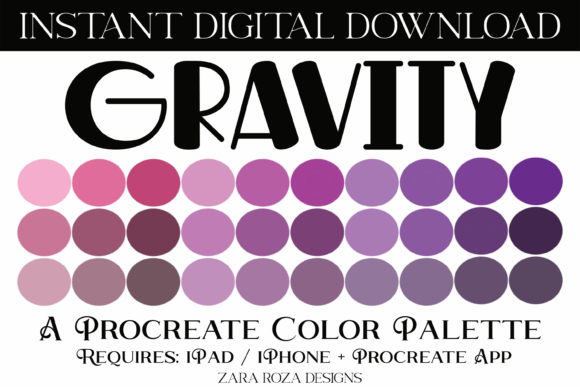
Whether you're a seasoned digital artist or just starting out, the Gravity Procreate Color Palette offers a versatile and inspiring selection of 30 carefully curated color swatches. Designed for use in the Procreate app on iPad, this palette brings together soft pastels, vibrant brights, muted tones, and rich dark shades—perfect for a wide range of creative projects.
The palette’s color range includes gradients of pink, purple, and brown, making it ideal for creating depth, contrast, and emotional resonance in your digital illustrations. From hand lettering and custom hair tones to festive holiday designs and planner aesthetics, this palette adapts beautifully to diverse artistic needs.
What’s Included in the Gravity Procreate Color Palette?
This digital download includes a single .swatches file with 30 harmonious color swatches, all compatible with the Procreate app on iPad. The file format ensures seamless integration into your digital workflow, allowing you to focus more on creativity and less on setup.
- Soft pastel shades for gentle, dreamy illustrations
- Bright tones for high-impact designs and festive themes
- Light and dark variations for depth and contrast
- Pink, purple, and brown tones for ombre effects and tonal consistency
Once downloaded, simply tap the .swatches file on your iPad and it will automatically import into Procreate. No extra steps, no compatibility issues—just instant access to a cohesive and expressive color scheme.
How Artists Can Use the Gravity Palette
The flexibility of the Gravity Procreate Color Palette makes it a go-to resource for a variety of creative applications. Whether you're illustrating for personal enjoyment, professional projects, or social media content, this palette supports a broad range of artistic goals.
Here are a few ways different creators can apply the palette:
- Illustrators: Use the soft pastel tones for character design, children’s book illustrations, or botanical art. The smooth gradients and muted shades help create a calming visual flow.
- Lettering Artists: Bright and bold tones from the palette pop beautifully in hand-drawn typography. Combine them with neutral backgrounds for contrast and readability.
- Planners & Journalers: The palette works seamlessly with digital planning apps like Goodnotes, Notability, and Noteshelf. Use the muted shades for subtle headers and the brighter tones for highlight sections or mood trackers.
- Event Designers: Whether you're designing wedding invitations, baby shower cards, or birthday party themes, the pink, purple, and brown tones provide a warm and elegant foundation.
- Seasonal Artists: From Christmas reds and greens to Valentine’s Day pinks and Easter pastels, the palette’s versatility makes it easy to adapt for holidays and celebrations.
Customizing the Palette for Your Style
While the Gravity Procreate Color Palette is thoughtfully designed out of the box, its real strength lies in its adaptability. You can tweak and combine colors to suit your personal aesthetic or project requirements.
Try these customization ideas:
- Adjust Saturation: Lower the saturation for a minimalist, muted look or increase it for vibrant, eye-catching designs.
- Limit Your Selection: Use only 5–7 colors from the palette to maintain visual consistency, especially for branding or logo mockups.
- Mix with Neutrals: Pair the palette's colors with black, white, or gray to balance intensity and improve readability in text-heavy designs.
- Create Ombre Effects: Use the built-in gradients in the palette to create smooth transitions between light and dark tones in digital brush work or background design.
Experimenting with layer blending modes in Procreate can also yield new effects—try overlay, multiply, or screen to add depth or texture without overworking your composition.
Projects That Shine with Gravity Palette
Here are a few project ideas that benefit from the Gravity Procreate Color Palette:
- Custom Hair Color Illustrations: The brown and purple tones help create natural or fantasy hair colors that look realistic and dimensional.
- Festive Holiday Cards: Use the bright tones for cheerful Christmas or Valentine’s Day cards, and the darker shades for elegant New Year or Halloween designs.
- Printable Art Prints: The soft pastels and muted gradients are perfect for creating calming wall art or printable quotes for home decor.
- Hand-Drawn Planners: Whether you're designing digital stickers or layout templates, the palette supports a cohesive and professional look across pages.
- Character Design: From fantasy creatures to fashion sketches, the balanced color range supports expressive and dynamic character visuals.
Tips for Keeping Your Work Organized and Consistent
Using a cohesive color scheme like the Gravity Procreate Color Palette helps maintain visual harmony in your artwork. Here are a few tips to keep your projects clean and organized:
- Label Your Layers: Name each layer based on its function (e.g., "Background," "Line Art," "Shadows") to avoid confusion when revisiting your work.
- Use Layer Groups: Group related layers together, especially when working on multi-page or complex illustrations.
- Save Custom Palettes: If you modify the original palette, save your version in Procreate for future use. This ensures consistency across multiple projects.
- Test on Different Backgrounds: Preview your color choices on white, black, or textured backgrounds to ensure readability and contrast.
- Export with Purpose: When exporting for print or digital use, check the resolution and file format (PNG for transparency, JPEG for general use) to preserve quality.
Final Thoughts
The Gravity Procreate Color Palette is more than just a collection of colors—it's a tool that empowers creators to bring their ideas to life with clarity and cohesion. Whether you're illustrating for fun, designing for clients, or planning your next digital journal spread, this palette offers the flexibility and depth needed to support your creative journey.
With just one .swatches file and a few taps, you can unlock a world of artistic possibilities. So download the palette, open Procreate, and let your imagination guide the way. Happy drawing!