50 Hi-Res Watercolor Photoshop Brushes for Creative Digital Art
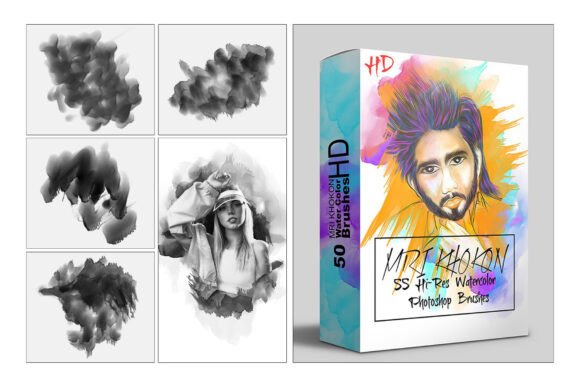
For digital artists, designers, and creatives looking to bring organic texture and painterly depth into their work, the 50 Hi-Res Watercolor Photoshop Brush set offers a powerful toolkit. This curated collection brings the fluid beauty of traditional watercolor into the digital space, giving users the flexibility to create everything from soft washes to bold, textured strokes—all within Photoshop.
What Makes This Brush Set Unique
Each brush in the 50 Hi-Res Watercolor Photoshop Brush set is designed to mimic the natural flow and grain of real watercolor paints. The high-resolution textures ensure crisp, detailed results even at large scales, making them ideal for print and digital work alike. The set includes a mix of abstract, grunge, and decorative brushes that span a wide visual spectrum—from clean, flowing washes to gritty, expressive marks.
Whether you're painting digital illustrations, designing invitations, or adding texture to marketing materials, this brush set gives you the tools to infuse your work with a handmade aesthetic. The compatibility with multiple versions of Photoshop (from CC2015.5 through CC2023) ensures accessibility for both new and experienced users.
Creative Applications Across Design Disciplines
- Illustration: Use soft watercolor brushes to create dreamy backgrounds or layer grunge textures for a more dynamic, expressive look.
- Graphic Design: Add organic elements to logos, posters, or branding materials to give a tactile, handcrafted feel.
- Marketing & Social Media: Enhance promotional visuals with subtle watercolor overlays or bold splashes to draw attention and add visual interest.
- Blog & Web Design: Incorporate delicate brush strokes into headers, dividers, or background elements for a cohesive, artistic theme.
- Print & Stationery: Design greeting cards, wedding invitations, or packaging with a painterly touch that stands out.
How Different Users Can Benefit
Freelance illustrators can use this brush set to quickly add depth and realism to their digital paintings. Small business owners may find value in using the brushes to create custom social media graphics that feel more personal and less mass-produced. Educators and bloggers can integrate watercolor textures into infographics and visual content to make information more engaging and visually appealing.
Entrepreneurs launching a new brand can use the abstract brushes to craft unique pattern overlays or background textures that help establish a distinct visual identity. Meanwhile, hobbyists and DIY creators can experiment with different brush combinations to develop original art prints, digital journals, or handmade-style digital cards.
Getting the Most from Your Brushes
Here are a few practical tips to help you make the most of the 50 Hi-Res Watercolor Photoshop Brush set:
- Layer with Purpose: Don’t overdo it—use brushes selectively to maintain clarity and visual hierarchy in your design.
- Mix Brush Types: Combine clean washes with textured grunge brushes to create contrast and visual depth.
- Adjust Opacity and Flow: Experiment with different settings to achieve subtle or bold effects depending on your project needs.
- Customize Brushes: Tweak brush settings like scattering, texture, and size to adapt them to your personal style.
- Use Smart Objects: Keep your workflow non-destructive by applying brushes on separate layers or using smart filters.
Project Ideas to Spark Inspiration
Try these creative uses to explore the full potential of the 50 Hi-Res Watercolor Photoshop Brush set:
- Create a watercolor-style mood board for a brand or interior design concept.
- Design a series of digital stickers or planners with soft watercolor backgrounds.
- Develop a line of greeting cards using layered watercolor effects and brush textures.
- Enhance digital portraits with subtle watercolor washes for a painterly finish.
- Design website headers or hero images with abstract brush strokes that reflect a brand’s color palette.
Staying Organized and Consistent
When working with a large brush set like this, it’s easy to get overwhelmed by choices. To keep your workflow efficient:
- Organize brushes into custom brush presets based on style (e.g., “Clean Washes,” “Grunge Textures”).
- Label your layers clearly when applying brush effects to maintain an editable file structure.
- Save favorite brush combinations as layer styles or actions for quick reuse.
- Keep a test file open to preview brush effects before applying them to your main project.
Final Thoughts
The 50 Hi-Res Watercolor Photoshop Brush set is more than just a collection of digital tools—it's a creative catalyst. Whether you're looking to refine your personal art style or enhance client projects with a touch of organic texture, these brushes offer flexibility, quality, and inspiration. By understanding how to use them effectively and thoughtfully integrating them into your workflow, you can elevate your digital artistry and bring a fresh, expressive dimension to your designs.
Ready to explore new creative horizons? Download the brush set and start experimenting with how watercolor textures can transform your next digital project.